Tuesday, February 11, 2014

Automated Checkpoint Tuning (MTTR)

Overview
Determining the time to recover from an instance failure is a necessary component for reaching required service levelsagreements. For example, if service levels dictate that when a node fails, instance recovery time can be no more than 3 minutes, FAST_START_MTTR_TARGET should be set to 180
Fast-start checkpointing refers to the periodic writes by the database writer (DBWn) processes for the purpose of writing changed data blocks from the Oracle buffer cache to disk and advancing the thread-checkpoint. Setting the database parameter FAST_START_MTTR_TARGET to a value greater than zero enables the fast-start checkpointing feature.
Fast-start checkpointing should always be enabled for the following reasons:
  • It reduces the time required for cache recovery, and makes instance recovery time-bounded and predictable. This is accomplished by limiting the number of dirty buffers (data blocks which have changes in memory that still need to be written to disk) and the number of redo records (changes in the database) generated between the most recent redo record and the last checkpoint.
     
  • Fast-Start checkpointing eliminates bulk writes and corresponding I/O spikes that occure traditionally with interval- based checkpoints, providing a smoother, more consistent I/O pattern that is more predictable and easier to manage.
If the system is not already near or at its maximum I/O capacity, fast-start checkpointing will have a negligible impact on performance. Although fast-start checkpointing results in increased write activity, there is little reduction in database throughout, provided the system has sufficient I/O capacity.
Check-Pointing
Check-pointing is an important Oracle activity which records the highest system change number (SCN,) so that all data blocks less than or equal to the SCN are known to be written out to the data files. If there is a failure and then subsequent cache recovery, only the redo records containing changes at SCN(s) higher than the checkpoint need to be applied during recovery.
As we are aware, instance and crash recovery occur in two steps - cache recovery followed by transaction recovery. During the cache recovery phase, also known as the rolling forward stage, Oracle applies all committed and uncommitted changes in the redo log files to the affected data blocks. The work required for cache recovery processing is proportional to the rate of change to the database and the time between checkpoints.
Mean time to recover (MTTR)
Fast-start recovery can greatly reduce the mean time to recover (MTTR), with minimal effects on online application performance. Oracle continuously estimates the recovery time and automatically adjusts the check-pointing rate to meet the target recovery time.
With 10g, the Oracle database can now self-tune check-pointing to achieve good recovery times with low impact on normal throughput. You no longer have to set any checkpoint-related parameters.
This method reduces the time required for cache recovery and makes the recovery bounded and predictable by limiting the number of dirty buffers and the number of redo records generated between the most recent redo record and the last checkpoint. Administrators specify a target (bounded) time to complete the cache recovery phase of recovery with the FAST_START_MTTR_TARGET initialization parameter, and Oracle automatically varies the incremental checkpoint writes to meet that target.
The TARGET_MTTR field of V$INSTANCE_RECOVERY contains the MTTR target in effect. The ESTIMATED_MTTR field of V$INSTANCE_RECOVERY contains the estimated MTTR should a crash happen right away.
Enable MTTR advisory
Enabling MTTR Advisory Enabling MTTR Advisory involves setting two parameters:
STATISTICS_LEVEL = TYPICAL
FAST_START_MTTR_TARGET > 0
Estimate the value for FAST_START_MTTR_TARGET as follows:
SELECT TARGET_MTTR,
       ESTIMATED_MTTR,
       CKPT_BLOCK_WRITES
  FROM V$INSTANCE_RECOVERY;
TARGET_MTTR ESTIMATED_MTTR CKPT_BLOCK_WRITES
----------- -------------- -----------------
        214             12            269880
FAST_START_MTTR_TARGET = 214;
Whenever you set FAST_START_MTTR_TARGET to a nonzero value, then set the following parameters to 0.
LOG_CHECKPOINT_TIMEOUT = 0
LOG_CHECKPOINT_INTERVAL = 0
FAST_START_IO_TARGET = 0
Disable MTTR advisory
FAST_START_MTTR_TARGET = 0
LOG_CHECKPOINT_INTERVAL = 200000

Source: http://www.akadia.com/services/ora_checkpoint_tuning.html

Monday, February 10, 2014

R12 APPS Front End Login issue after the Clone.


R12 APPS  Front End Login issue after the clone.
I was able to see the front end screen but, was not able to go beyond login page after submitting login credentials and got with below error:
Error Page 
You have encountered an unexpected error. Please contact the System Administrator for assistance. 

Implementation 1 ----- not worked

Updating WorkFlow tables:
 
begin apps.wf_local_synch.BULKSYNCHRONIZATION(P_ORIG_SYSTEM=>'ALL',
P_PARALLEL_PROCESSES=>2,
P_LOGGING=>'LOGGING', P_RAISEERRORS=>TRUE,
P_TEMPTABLESPACE=>'APPLSYSX');
END;
/
http://oracleajidba.blogspot.com/2010/05/unable-to-login-after-clone-you-have.html ----- not working


Implementation 2 ----- not worked

SQL> SELECT profile_option_name  FROM fnd_profile_options_tl  WHERE lower(user_profile_option_name) like lower('App%log%agent');
PROFILE_OPTION_NAME
--------------------------------------------------------------------------------
APPS_LOGICAL_AGENT
APPS_LOGICAL_AGENT
APPS_LOGICAL_AGENT
APPS_LOGICAL_AGENT

SQL> select PROFILE_OPTION_NAME, PROFILE_OPTION_ID from fnd_profile_options where lower(PROFILE_OPTION_NAME) like lower('App%log%agent');
PROFILE_OPTION_NAME       PROFILE_OPTION_ID
------------------------- -----------------
APPS_LOGICAL_AGENT                     8492

SQL> select PROFILE_OPTION_VALUE from fnd_profile_option_values where PROFILE_OPTION_ID='8492';
no rows selected
SQL>

https://community.oracle.com/thread/1125331


Implementation 3 ----- not worked

Cleared Cache.
JSP Pages Hanging in R12 After Removing Cached Class Files in _pages (Doc ID 433386.1)
http://onlineappsdba.com/index.php/2009/06/02/compiling-jsps-at-runtime-in-oracle-apps-r12/

Got with below error after submitting username/password from front end.

<PRE>SQL_PLSQL_ERROR &#40;ERRNO=1000&#41; &#40;REASON=java.sql.SQLException: ORA-01000: maximum open cursors exceeded &#41; &#40;ROUTINE=decryptSessionCookie&#40;String&#41;&#41; ICX_SESSION_FAILED </PRE>
Servlet error: An exception occurred. The current application deployment descriptors do not allow for including it in this response. Please consult the application log for details.


Implementation 4

Earlier both cursors were 50, now changed it to 500;
alter system set session_cached_cursors=500 scope=spfile;
alter system set open_cursors=600 scope=both;

Bounce DB


Implementation 5

adadmin ----------- failed with below error
Not Possible to spawn any processes on on the database. Database has reached it limit with respect to maximum processes

SQL> alter system set processes=500 scope=spfile;


Implementation 6

SQL> select SESSION_COOKIE_DOMAIN from ICX_PARAMETERS;
SESSION_COOKIE_DOMAIN
------------------------------

select fnd_web_sec.validate_login('SYSADMIN','welcome2014') from dual;
Again, this command should return 'Y' if it is working OK.

If not, you should reload the jar files to the database using adadmin.
(adadmin, upload jar, db) --------- This worked!!!!!! Now able to login

http://beginapps.blogspot.com/2008/09/troubleshooting-login-problems-in.html


Tuesday, February 4, 2014

Reconfigure Oracle EM 11g

These are the steps:
1. Change the %ORACLE_HOME%\network\admin\listener.ora file from an IP number to machine name.
2. Change the %ORACLE_HOME%\network\admin\tnsnames.ora file from an IP number to a machine name.
3. Change the C:\WINDOWS\System32\drivers\etc\hosts file by adding this line beneath the default localhost line (for the new Hostname value):
127.0.0.1       localhost
172.16.113.128  mclaughlin11g mclaughlin11g.techtinker.com
4. Change the Windows hostname by navigating: Start > Control Panel > System (classic view) from the random assignment of VMWare Fusion.
5. Reboot the machine to set the networking. Unlock the SYSMAN account because it ensures that emca can drop it and all dependencies. Then, drop the em configuration with the following commands.
C:\Data> set ORACLE_SID=orcl
C:\Data> emca -deconfig dbcontrol db -repos drop
6. You’ll receive the following prompts, enter the Oracle SID and Port number without double quotes but you must enter all passwords with double quotes (at least in Oracle Database 11g):
Oracle Database 11gR1
STARTED EMCA at Jul 13, 2008 8:26:42 AM
EM Configuration Assistant, Version 11.1.0.5.0 Production
Copyright (c) 2003, 2005, Oracle.  All rights reserved.
 
Enter the following information:
Database SID: orcl
Listener port number: 1521
Password for SYS user:
Password for SYSMAN user:
Do you wish to continue? [yes(Y)/no(N)]: y
Oracle Database 11gR2
STARTED EMCA at Sep 3, 2012 7:40:07 PM
EM Configuration Assistant, Version 11.2.0.0.2 Production
Copyright (c) 2003, 2005, Oracle. All rights reserved.
 
Enter the following information:
Database SID: orcl
Listener port number: 1521
Password for SYS user:
Password for SYSMAN user:
 
Do you wish to continue? [yes(Y)/no(N)]: y
7. If you failed to unlock the SYSMAN account in step #5, you should drop the SYSMAN user manually. If you don’t drop the SYSMAN schema, you’ll raise an error when you try to recreate it:
CONFIG: ORA-20001: SYSMAN already EXISTS..
ORA-06512: at line 17
 
oracle.sysman.assistants.util.sqlEngine.SQLFatalErrorException: ORA-20001: SYSMAN already EXISTS..
ORA-06512: at line 17
The Java stack trace will look like this, more or less based on version and release:
at oracle.sysman.assistants.util.sqlEngine.SQLEngine.executeImpl(SQLEngine.java:1530)
at oracle.sysman.assistants.util.sqlEngine.SQLEngine.executeScript(SQLEngine.java:880)
at oracle.sysman.assistants.util.sqlEngine.SQLPlusEngine.executeScript(SQLPlusEngine.java
at oracle.sysman.emcp.EMReposConfig.createRepository(EMReposConfig.java:492)
at oracle.sysman.emcp.EMReposConfig.invoke(EMReposConfig.java:218)
at oracle.sysman.emcp.EMReposConfig.invoke(EMReposConfig.java:147)
at oracle.sysman.emcp.EMConfig.perform(EMConfig.java:222)
at oracle.sysman.emcp.EMConfigAssistant.invokeEMCA(EMConfigAssistant.java:535)
at oracle.sysman.emcp.EMConfigAssistant.performConfiguration(EMConfigAssistant.java:1215)
at oracle.sysman.emcp.EMConfigAssistant.statusMain(EMConfigAssistant.java:519)
at oracle.sysman.emcp.EMConfigAssistant.main(EMConfigAssistant.java:468)
Drop the user and dependent on version a few other objects, like:
DROP USER sysman CASCADE;
DROP PUBLIC SYNONYM setemviewusercontext;
DROP ROLE mgmt_user;
DROP PUBLIC SYNONYM mgmt_target_blackouts;
DROP USER mgmt_view;
8. You can then create the em environment with the following syntax:
C:\Data> emca -config dbcontrol db -repos create
9. Again, you’ll receive the following prompts, enter the Oracle SID and Port number without double quotes but you must enter all passwords with double quotes (at least in Oracle Database 11g):
STARTED EMCA at Jul 13, 2008 8:28:48 AM
EM Configuration Assistant, Version 11.1.0.5.0 Production
Copyright (c) 2003, 2005, Oracle.  ALL rights reserved.
 
Enter the following information:
DATABASE SID: orcl
Listener port NUMBER: 1521
Password FOR SYS USER:
Password FOR DBSNMP USER:
Password FOR SYSMAN USER:
Password FOR SYSMAN USER: Email address FOR notifications (optional):
Outgoing Mail (SMTP) server FOR notifications (optional):
-----------------------------------------------------------------
 
You have specified the following settings
 
DATABASE ORACLE_HOME ................ C:\app\Administrator\product\11.1.0\db_1
 
LOCAL hostname ................ mclaughlin11g
Listener port NUMBER ................ 1521
DATABASE SID ................ orcl
Email address FOR notifications ...............
Outgoing Mail (SMTP) server FOR notifications ...............
 
-----------------------------------------------------------------
 
Do you wish TO continue? [yes(Y)/no(N)]: y
A note to me, remember haste makes waste. I’m just glad that rebuilding the MarkLogic server was easy.

Source:http://blog.mclaughlinsoftware.com/oracle-architecture-configuration/changing-windows-hostname-and-oracle-enterprise-manager/

Uninstalling Oracle 10g Manually from Windows 7

I have uninstalled Oracle 10g manually for my  Windows 7. Here are the steps bellow:

SQL> shut immediate

SQL> startup mount exclusive restrict;
ORACLE instance started.

SQL> select name from v$database;

SQL> drop database;
Database dropped.


Step 1:
Use Oracle Universal installer to deinstall Oracle.
Follow the steps and select correct oracle home to remove it.
1. Go to,
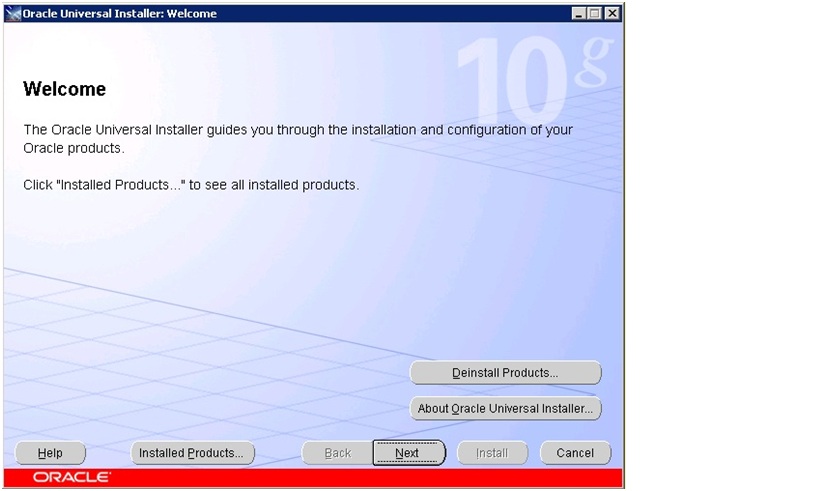
 start --> all programs oracle –-> xxx db –-> Oracle Installation Products –-> Universal Installer.
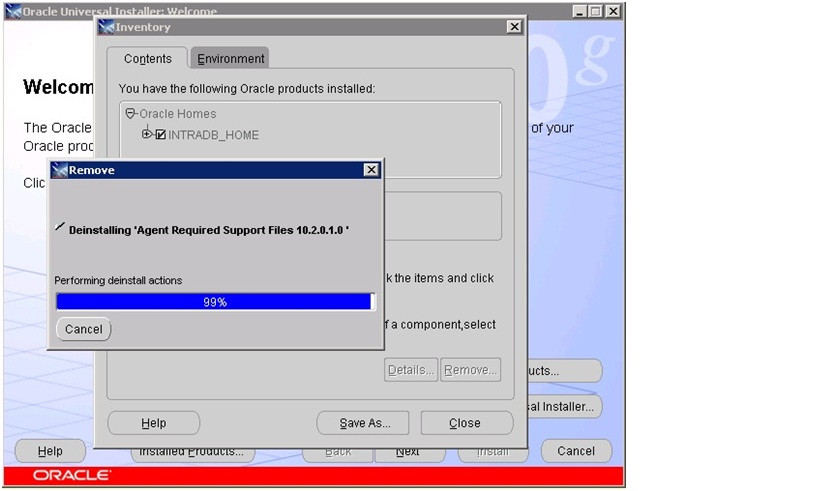
Following screen will open,Click on Deinstall products to deinstall the Oracle.
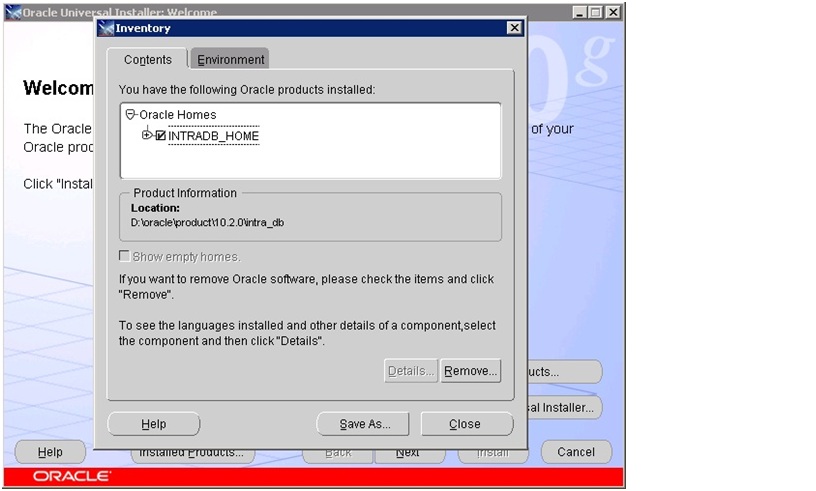
2. Select the appropriate ORACLE HOME which we have to uninstall.
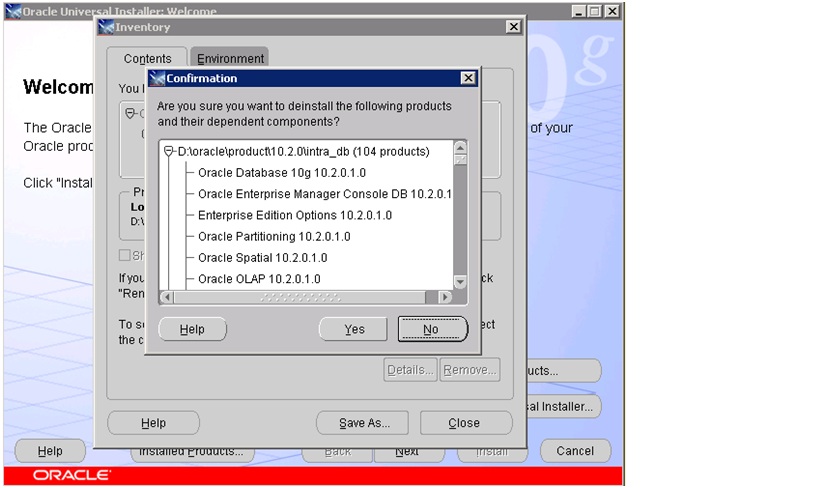
3. Click on Yes to deinstall the selected ORACLE HOME.
4.
5.
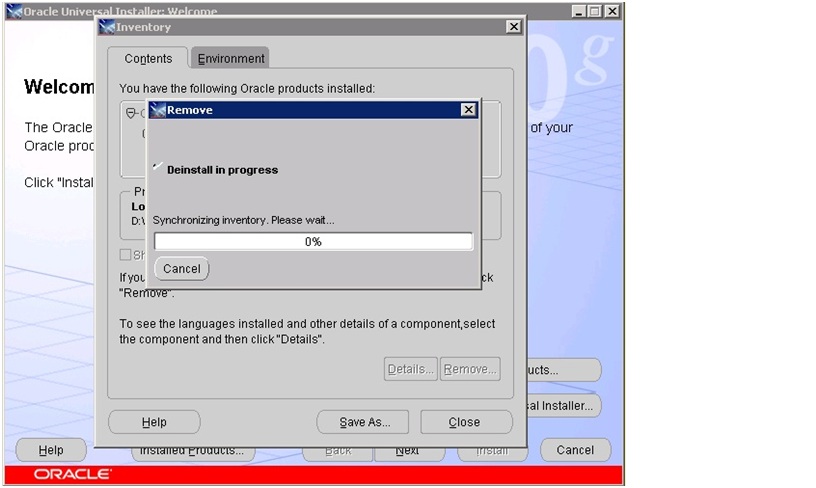
6. After completing the deinstallation, click on Exit to exit the setup.
Step 2:

After running the supplied Oracle uninstallation utility (which may or may not do some or all of the following):
Stop any Oracle services that have been left running.
Start->Settings->Control Panel->Services.
Look for any services with names starting with ‘Oracle’ and stop them.
Step 3:
Take the backup of your registry in case you accidentally delete other thing (wrongly delete any entry in registry might let to reinstall whole server.)
Go to DOS command prompt type regedit
Step 4:
• Run regedit and delete the following keys (some may have slightly different names in your registry):
HKEY_CURRENT_USER\SOFTWARE\ORACLE
HKEY_LOCAL_MACHINE\SOFTWARE\ORACLE
HKEY_LOCAL_MACHINE\SYSTEM\CurrentControlSet\Services\EventLog\Application\Oracle.oracle
HKEY_LOCAL_MACHINE\SYSTEM\CurrentControlSet\Services\OracleDBConsole
HKEY_LOCAL_MACHINE\SYSTEM\CurrentControlSet\Services\Oracle10g_home
HKEY_LOCAL_MACHINE\SYSTEM\CurrentControlSet\Services\OraclService
Step 5:
Reboot the system.
• Delete the Oracle home directory.
D:\Oracle.
• Delete the Oracle Program Files directory:.
D:\Program Files\Oracle.
• Delete the Oracle Start Menu shortcuts directory:.
D:\Documents and Settings\All Users\Start Menu\Programs\Oracle*
Where * indicates the name of your install. Look for and remove all Oracle directories from that location.
Step 6:
• Remove Oracle refereces from the path. To edit your path go to:
Start->Settings->Control Panel->System->Advanced->Environment Variables.
Edit both of the environment variables user PATH and system PATH. Remove any Oracle references in them.

Source:http://deveshdba.wordpress.com/2012/06/27/uninstalling-oracle-10g-manually-from-windows-2003-server/

WIN: Manually Removing all Oracle Components on Microsoft Windows Platforms (Doc ID 124353.1)

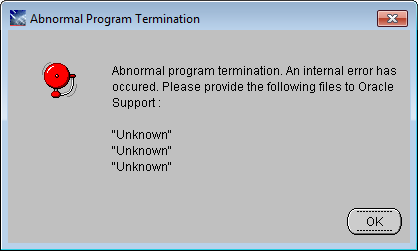
Oracle Universal Installer: Abnormal Program Termination

After installing/uninstalling Oracle  there may appear the following alert:
Abnormal Program Termination OUI
This is very known error.

To solve this, do the following steps:
Note that I am explaining the steps for installing Oracle, after you read this you will be able to solve the problem during uninstalling Oracle.
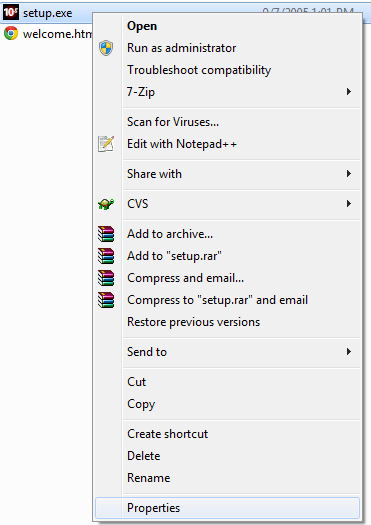
1. Find setup.exe file and go to its properties(right click -> properties)
setup_properties
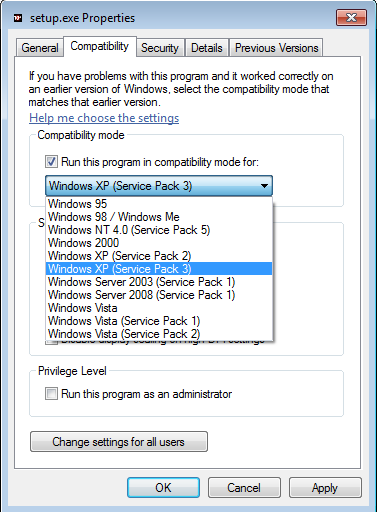
2.  Go to “Compatibility” tab  and check “Run this program in compatibility mode for:“. Then choose “Windows XP (Service pack 3)” or what ever you prefer.
setup_properties_Compatibility
Click ok.
3. Right click “setup.exe” and choose “Run as administrator “

Source:http://dba010.wordpress.com/2012/02/02/oracle-universal-installer-abnormal-program-termination/

Friday, January 24, 2014

Friday, January 10, 2014

Forms 11i Issue --- APP-FND-01931

Forms 11i Issue:
"APP-FND-01931:Your session is no longer valid or your logon information could not be reestablished from your session."


Solution:
Open IE browser.
Tools --> Internet Options.
Select security --> choose Custome Level.
Change the Enable XSS filter to Disable.
Apply --> Ok.


Thursday, December 26, 2013

Clearing Cache in R12 instance


1- Stop Apache --- adapcctl.sh stopall

2- Clear cache  cd $COMMON_TOP/-----remove _pages  and create _pages

mkdir _pages
chmod 777 _pages

3-  cd $FND_TOP/patch/115/bin


$ ./ojspCompile.pl --compile --flush -p 2
logfile set: /test/mtlog/test_localhost/logs/appl/rgf/ojsp/ojspc_error.log
starting...(compiling all)
using 10i internal ojsp ver: 10
synchronizing dependency file:
enumerating jsps...8001
parsing jsp...8001
writing deplist...8001
initializing compilation:
eliminating children...5912 (-2089)
translating and compiling:
translating jsps...5912/5912 in 4m39s                
compiling jsps...5912/5912 in 17m30s                
Finished!
$

4- Start Apache -- adapcctl.sh startall

Compiling single jsp

ojspCompile.pl --compile -s 'fnd%' -p 20


How to clear cache for a specific component in R12

As we all know the normal tendency for clearing cache in Oracle Apps is to delete the $COMMON_TOP/_pages directory.In 11i, after deleting we dont have to recompile the jsps but in R12 we have to recompile the pages since s_jsp_main_mode is set to justrun by default which is in turn updated in orion-web.xml

How can i clear cache for a specific component of Oracle Apps R12 viz., iprocurement, istore etc.,
Is this even possible ? Yes it is and this option comes handy when somebody modifies a jsp page which is part of say istore,then it makes sense to clear cache for istore and not for the whole server.

Clearing cache for specific Component/Application in R12

Login as sysadmin
Select Functional Administrator responsibility
Go to Core Services ==> Caching Framework ==> Tuning
Query the application (for example iStore) or by Name or code.
Select the component and clear the cache.

Note: For some specific configuration changes, we need to bounce Apache also.

Clearing Global Cache in R12

a) Go to Functional Administrator Responsibility
b) Go to Core Services ==> Caching Framework
c) Go to Global configuration and clear all the cache from there.(Only If you want to clear all the  cache)


For further reading:
http://applicationsdba.blogspot.in/2008/01/r12-beware-executing-rm-rf.html
http://www.pythian.com/blog/jsp-cache-issues-in-11i-and-r12/

Wednesday, December 25, 2013

Difference between Simle Past and Present Perfect

Simple Past:
I read the article yesterday.
--specific time, task completed.

Examples:
I worked hard "yesterday/last week/last month"

Questioning:
When did you move to USA? --- exact time


Present Perfect:
I have read the article.
--no specific time, task completed sometime in past.

Examples:
I have worked hard this "week/semester"
I have worked hard since "6 am/January"

Questioning:
How long have you been in USA? --- duration of time

Usage of Past Simple and Past Perfect

8:00 -- wake up
8:15 -- eat breakfast

After I had woken up, I ate breakfast.
Past Perfect + Simple Past

5:15 -- have a bath
5:30 -- watch TV

After I had had a bath, I watched TV.

English Grammar

Sites for English Grammar.

http://web2.uvcs.uvic.ca/courses/elc/studyzone/

Sunday, December 22, 2013

Some of the known issues on Forms in EBS


[Document 758661.1]


[Document 973632.1]


[Document 1269544.1]


[Document 1062246.1]


[Document 465926.1]


[Document 429627.1]


[Document 779065.1]


[Document 1175400.1]


[Document 734077.1


Note 1258305.1 Users Receive FRM-92101 oracle.forms.net.ConnectionException Errors When Launching E-Business Suite Forms Responsibility and Function
Note 454427.1 R12: "FRM-92101:There was a failure in the Forms Server during startup" Error When Attempting to Launch Forms
Note 438231.1 FRM-92050 Connecting and "Failed to exec runform f60webmx" Starting Forms Server
Note 1103744.1 R12: "FRM-92101: There Was a Failure in the Forms Server During Startup" Error When Loading Forms
Note 1056333.1 Forms Error With FRM-91126 invalid value timezlrg#dat
Note 744093.1 FRM-92050 With "Connection reset by peer: JVM_recv in socket input stream read" Error When Launching Form On Microsoft Servers
Note 1203773.1 Forms raises FRM-92100 Caused By Java.IllegalStateException:Cannot Open System Clipboard
note 130686.1 How to Generate Form, Library and Menu for Oracle Applications
Note 438652.1 R12: Forms Runtime Diagnostics (FRD), Tracing And Logging For Forms In Oracle Applications
Note 840577.1 Getting FRM-41839 FRM-41092 FRM-40737 FRM-40734 When Using Mouse Scroll on Oracle Applications 12.0.4
Note 550364.1 FRM-40735: Pre-Update Trigger Raised Unhandled Exception ORA-04062
Note 754347.1 FRM-40833: Could not completely load the dynamic user exit libraries
Note 399652.1 Getting FRM-41800 when navigating to any LOV and Focus Lost
Note 1369830.1 R12 Forms Slow performance / Freezes / Hangs for large # Record details using View -> Last -> Record
For troubleshooting you may review the following:

Note 365529.1 Troubleshooting FRM-92XXX Errors in Oracle Applications
Note 311019.1 Troubleshooting FRM-92100 Issues In Oracle Applications 11i
Note 402674.1 Tips and Queries for Troubleshooting Forms Session Timeout Issues
Note 164220.1 Troubleshooting "FRM-92160: Web client version too old" Error in R11i
Note 810084.1 Troubleshooting"Forms CGI error: URL Contains One Or More Restricted Characters" In Apps 11i
Note 136027.1 Troubleshooting Oracle Forms 6i Issues With Oracle Applications 11i
Note 299187.1 11i: How to Troubleshoot Error "FRM-92050 Failed to connect to the server"
Note 164220.1 Troubleshooting "FRM-92160: Web client version too old" Error in R11i