Source: http://one-size-doesnt-fit-all.blogspot.com/2009/09/weblogic-server-identity-vs-trust.html
Summary:
Identity keystore:
This will be used to store the server certificate(private key/digital certificate pairs). When the client contacts server the digital certificate presented in this keystore will be sent.
Trust Keystore:
This will contain all the certificates for the trusted partners(ie partners). When server connects with the partner it will use this key store.
In computing most technologies have lots of terms and acronyms to learn, it's par for the course, you get used to it. However in computer security the frustration is multiplied as there are often many different terms that mean the same thing. It makes implementing security hard, because understanding it is hard, and I'm not surprised why security is considered badly implemented because the average Joe will struggle.
I've been trying recently to get straight in my head what is stored in the WLS identity and trust keystores, and what the difference between identity and trust is anyhow. Thanks to kind assistance from Gerard Davison, I think I can now post my understandings, and as usual, hopefully the post is helpful to other readers. As noted however security to me is a difficult area, and so be sure to check the facts here, your mileage with this post may vary.
The following WLS documentation attempts to explain the concepts of identity and trust:
http://download.oracle.com/docs/cd/E12839_01/web.1111/e13707/identity_trust.htm#i1170342
...in ripping out one of the core paragraphs, with a slight rewrite of my own we can see the concept of identity, and how it relates to the public and private keys:
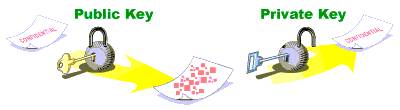
"The public key is embedded in a digital certificate with additional information describing the owner of the public key, such as name, street address, and e-mail address *as well as the hostname*. *Along with this the digital certificate containing the public key, and the separate related private key, provide identity for the server*."
...ultimately to identify the server, to assert the server is who the server says it is.
The digital certificate containing the public key is also referred to as the "server certificate", as for example in 1-way-SSL traffic between the server and client, the server certificate containing the public key is what is initially passed to the client.
There is a missing piece in the puzzle. Regardless that the digital certificate states the owner of the public key, their name and so on, how does a client know that the "identity" asserted by the digital certificate is true? That's where Certificate Authorities (CAs) come in.
Ignoring self signed digital certificates, a typical digital certificate used on the internet containing the public key and owner details is signed by a trusted CA who has verified the identity of the owner. Presumably when purchasing digital certificates from CAs, this is what some of the cost covers, the CAs research into ensuring that the identity details embedded in the digital cert are actually true.
At runtime on receiving the digital certificate, the client checks the CA and if the CA is one that the client trusts (or a CA in a chain of trusted CAs), then the identity of the server is established/verified.
Thus the "identity" of the server is established by what's stored in the "identity" keystore, and its contents are what are farmed out to clients establishing secure connections with the server, who then verify the supplied digital certificate's CA against the clients own list of trusted CAs. The "identity keystore" is also referred to as the "server keystore", because it establishes the server's identity (ie. I am who I say I am).
WLS side note: As mentioned the digital certificate also includes the host name of the server, or in other words the digital certificate is pegged to that server and that server alone. This implies on that server with its relating digital certificate, *all* of the applications will share that single digital certificate for secure communications. Occasionally a requirement will arise where each application must have its own digital certificate. In WLS because keystores are configured under an individual WLS "managed server", if you have two separate applications, it is not possible to use separate digital certificates for each in one managed server. The solution is to create another managed server with its own keystores.
WLS web service side note: Following on from the previous side note, for web services that use in-message encryption and digital signatures, there is often the requirement for multiple different digital certificates. Under WLS to provision the WS-Security model, WLS has a separate Web Service Security Configuration (WSSC) to provision this setup.
Finally regarding the trust keystore, what is its job in all of this? The trust keystore is typically used for storing CA digital certificates, essentially the CAs who will be used to check any digital certificates that are given to the server at runtime (just the same as the client did above). In the standard 1-way-SSL between a client and the WLS server, the trust keystore doesn't come into the equation as the client has its own trust keystore (containing the CAs) and the server has nothing to verify. Yet in the case of mutual SSL (aka. 2 way SSL) between the client and server, the client and server actually swap each other digital certificates to establish identity of both parties, and in this case the server must be able to test the identity of the client through the CA of the client's digital certificate.
Mutual SSL side note: the setup of mutual SSL is more complicated than this. Readers are advised to refer to the following Oracle article.
Summary:
Identity keystore:
This will be used to store the server certificate(private key/digital certificate pairs). When the client contacts server the digital certificate presented in this keystore will be sent.
Trust Keystore:
This will contain all the certificates for the trusted partners(ie partners). When server connects with the partner it will use this key store.
In computing most technologies have lots of terms and acronyms to learn, it's par for the course, you get used to it. However in computer security the frustration is multiplied as there are often many different terms that mean the same thing. It makes implementing security hard, because understanding it is hard, and I'm not surprised why security is considered badly implemented because the average Joe will struggle.
I've been trying recently to get straight in my head what is stored in the WLS identity and trust keystores, and what the difference between identity and trust is anyhow. Thanks to kind assistance from Gerard Davison, I think I can now post my understandings, and as usual, hopefully the post is helpful to other readers. As noted however security to me is a difficult area, and so be sure to check the facts here, your mileage with this post may vary.
The following WLS documentation attempts to explain the concepts of identity and trust:
http://download.oracle.com/docs/cd/E12839_01/web.1111/e13707/identity_trust.htm#i1170342
...in ripping out one of the core paragraphs, with a slight rewrite of my own we can see the concept of identity, and how it relates to the public and private keys:
"The public key is embedded in a digital certificate with additional information describing the owner of the public key, such as name, street address, and e-mail address *as well as the hostname*. *Along with this the digital certificate containing the public key, and the separate related private key, provide identity for the server*."
...ultimately to identify the server, to assert the server is who the server says it is.
The digital certificate containing the public key is also referred to as the "server certificate", as for example in 1-way-SSL traffic between the server and client, the server certificate containing the public key is what is initially passed to the client.
There is a missing piece in the puzzle. Regardless that the digital certificate states the owner of the public key, their name and so on, how does a client know that the "identity" asserted by the digital certificate is true? That's where Certificate Authorities (CAs) come in.
Ignoring self signed digital certificates, a typical digital certificate used on the internet containing the public key and owner details is signed by a trusted CA who has verified the identity of the owner. Presumably when purchasing digital certificates from CAs, this is what some of the cost covers, the CAs research into ensuring that the identity details embedded in the digital cert are actually true.
At runtime on receiving the digital certificate, the client checks the CA and if the CA is one that the client trusts (or a CA in a chain of trusted CAs), then the identity of the server is established/verified.
Thus the "identity" of the server is established by what's stored in the "identity" keystore, and its contents are what are farmed out to clients establishing secure connections with the server, who then verify the supplied digital certificate's CA against the clients own list of trusted CAs. The "identity keystore" is also referred to as the "server keystore", because it establishes the server's identity (ie. I am who I say I am).
WLS side note: As mentioned the digital certificate also includes the host name of the server, or in other words the digital certificate is pegged to that server and that server alone. This implies on that server with its relating digital certificate, *all* of the applications will share that single digital certificate for secure communications. Occasionally a requirement will arise where each application must have its own digital certificate. In WLS because keystores are configured under an individual WLS "managed server", if you have two separate applications, it is not possible to use separate digital certificates for each in one managed server. The solution is to create another managed server with its own keystores.
WLS web service side note: Following on from the previous side note, for web services that use in-message encryption and digital signatures, there is often the requirement for multiple different digital certificates. Under WLS to provision the WS-Security model, WLS has a separate Web Service Security Configuration (WSSC) to provision this setup.
Finally regarding the trust keystore, what is its job in all of this? The trust keystore is typically used for storing CA digital certificates, essentially the CAs who will be used to check any digital certificates that are given to the server at runtime (just the same as the client did above). In the standard 1-way-SSL between a client and the WLS server, the trust keystore doesn't come into the equation as the client has its own trust keystore (containing the CAs) and the server has nothing to verify. Yet in the case of mutual SSL (aka. 2 way SSL) between the client and server, the client and server actually swap each other digital certificates to establish identity of both parties, and in this case the server must be able to test the identity of the client through the CA of the client's digital certificate.
Mutual SSL side note: the setup of mutual SSL is more complicated than this. Readers are advised to refer to the following Oracle article.